No meeting reminders for that calendar.
Full screen meeting reminders · Meety Pro
Full screen meeting reminders for the meetings that matter.
Meety puts a full screen meeting reminder on your Mac only for the Google Calendar events that matter, like client calls, and keeps gentle reminders for everything else. The alert interrupts your work and takes you straight into the meeting with one Join button.
Full screen Hard Alert is part of Meety Pro. Heads-up reminders and snooze are free. Requires macOS 15.6 or later.
The problem
Why regular notifications get lost during focused work
A standard calendar notification is a small banner in the corner of the screen. When you are deep in a document, a design file, or code, it slides in and out without breaking your focus, which is exactly why it is easy to miss.
Browser-based reminders add another failure point: they only work while the right tab is open and notifications are allowed. For a routine check-in, that is fine. For a client call or an interview, a missed banner means joining late.
Per-calendar intensity
Full screen only for the calendars that matter
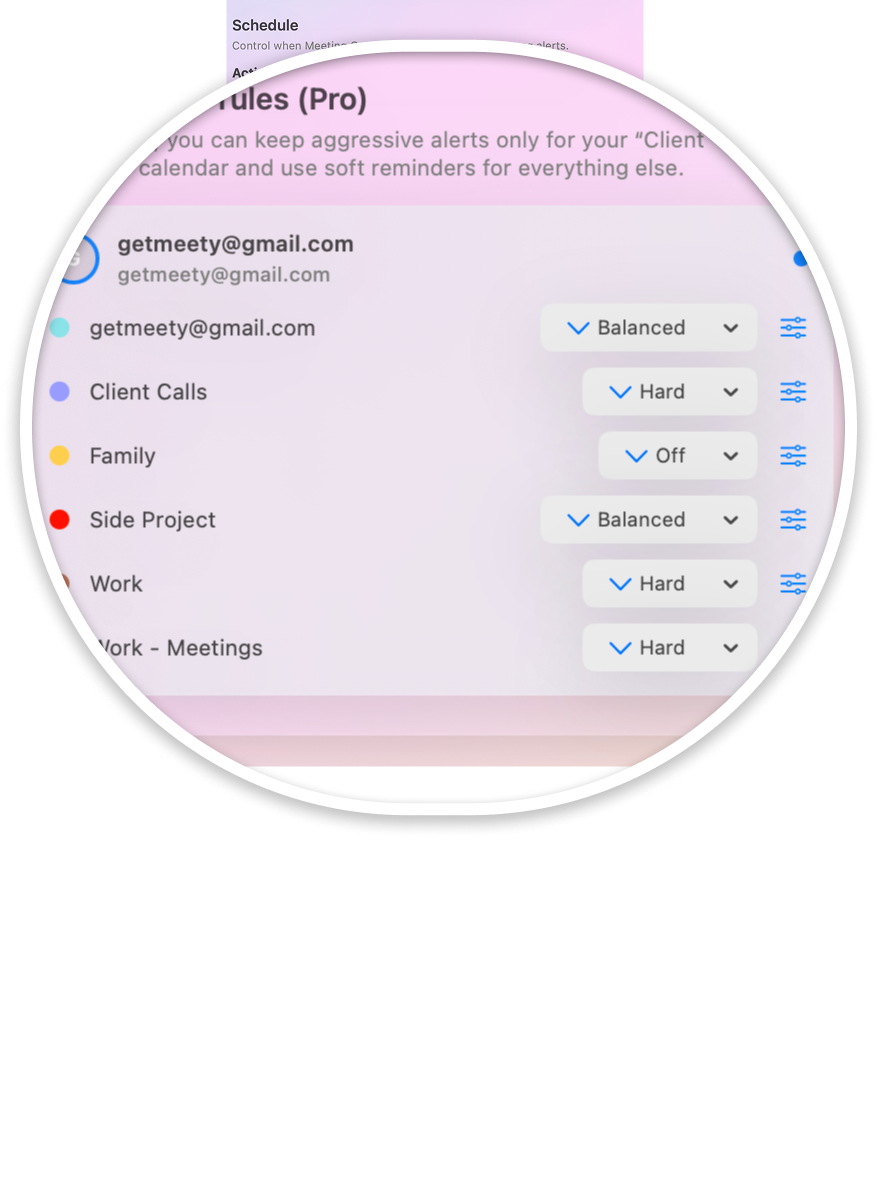
A full screen alert for every event would get old fast. With Meety Pro, you set reminder intensity per calendar, so the strongest alert is reserved for meetings where being late has a real cost.
A lighter reminder for events that can wait.
A heads-up before the meeting, with a Join button.
A full screen Hard Alert with a countdown and Join Now, before the meeting starts.
Example: one Mac, two kinds of meetings
Put your Clients calendar on Hard and your Personal calendar on Soft. A client kickoff takes over the screen with a Join Now button. A dentist appointment or a family event stays a gentle prompt. Your focus gets interrupted only when it is worth it.
From alert to call
A full screen alert that takes you straight into the meeting
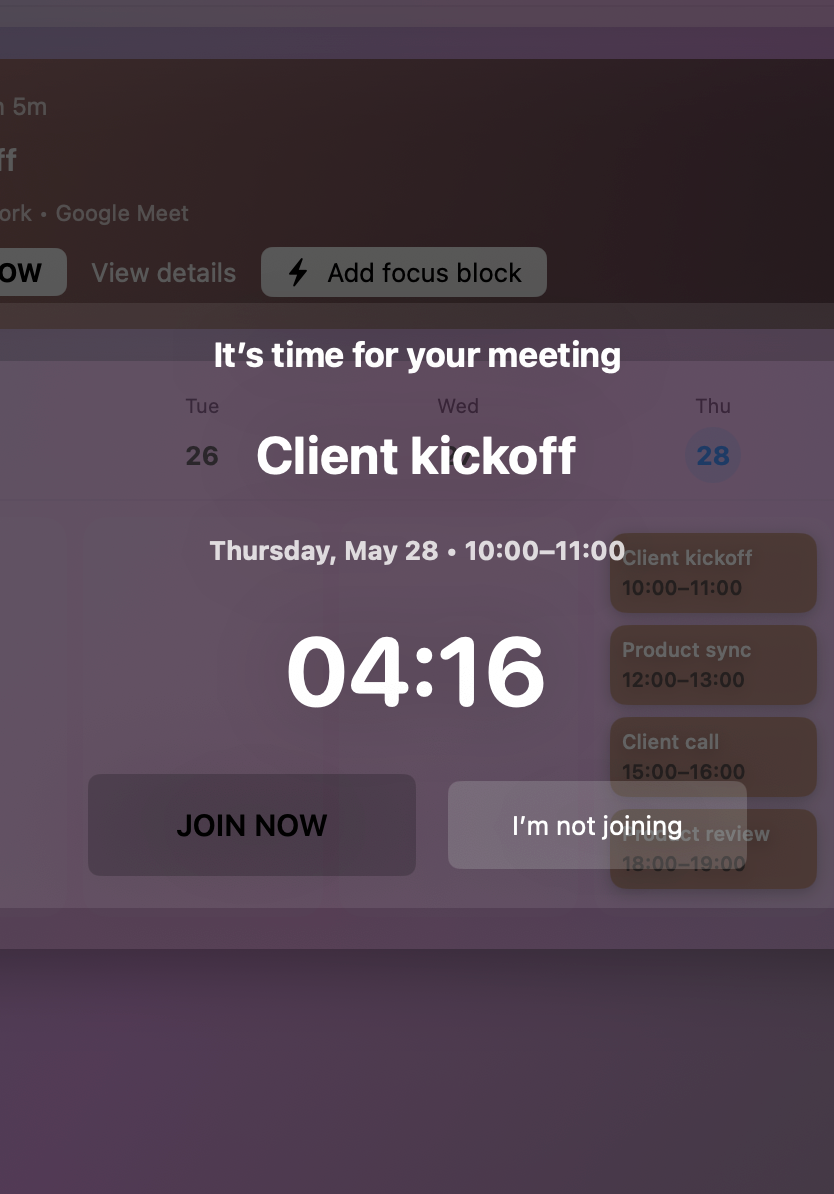
Before the meeting starts, a Hard Alert fills your screen with the meeting title, the time, and a live countdown. Below it is a Join Now button. If the Google Calendar event has a Google Meet, Zoom, or Microsoft Teams link, one click opens the call, with no hunting through the event description while the meeting starts without you.
Hard Alert keeps the choice simple: join now, or choose "I'm not joining" and get back to work. For routine calls where you want a few more minutes, use a heads-up reminder with snooze instead.
Google Calendar
Works with the Google Calendar you already use
Sign in with Google and choose the calendars Meety should follow. Two-way sync keeps Meety and Google Calendar in step, so reminders follow your real schedule.
Between alerts, Meety keeps your calendar in the Mac menu bar with Day, Week, Month, and Agenda views and a countdown to your next meeting.
Google Calendar in your Mac menu barFree and Pro
Free heads-up reminders. Full screen alerts with Pro.
Meety is free to download. The Free plan includes heads-up reminders and snooze. Meety Pro adds the full screen Hard Alert and per-calendar alert intensity.
Everyday meeting reminders
- Basic menu bar calendar
- Upcoming meetings
- Meet, Zoom, and Teams join support
- Standard reminders
- Heads-up reminders and snooze
Full screen Hard Alert for the calendars that matter
- Everything in Free
- Hard Alert
- Advanced alert intensity
- Per-calendar alert intensity
- Stronger reminder profiles
Purchases are handled by Apple. Prices shown are U.S. App Store prices and may vary by storefront. Compare Free and Pro plans
Looking for everyday reminders? See how Meety works as a meeting reminder app for Mac
Privacy
Your calendar data, with clear limits
Meety does not sell your data and does not use your Google Calendar event content for advertising. Its use of information received from Google APIs is intended to comply with the Google API Services User Data Policy, including the Limited Use requirements.
Read the Privacy PolicyFAQ
Full screen meeting reminders: common questions
How do I get full screen meeting reminders on Mac?
Download Meety from the Mac App Store, sign in with Google, and upgrade to Meety Pro. Then set the calendars that matter, such as your client or work calendar, to Hard. Before meetings from those calendars start, Meety shows a full screen Hard Alert with a countdown and a Join Now button.
Can I use full screen alerts only for important meetings?
Yes. With Meety Pro, you set reminder intensity per calendar: Off, Soft, Balanced, or Hard. Put only your important calendars on Hard, and everything else gets a lighter reminder or none at all.
Can I join the meeting from the full screen alert?
Yes. When the Google Calendar event includes a Google Meet, Zoom, or Microsoft Teams link, the full screen alert shows a Join Now button that opens the call in one click.
Is the full screen alert free?
The full screen Hard Alert is part of Meety Pro, at $3.99 per month or $29.99 per year (U.S. App Store prices). The Free plan includes heads-up reminders, snooze, the menu bar calendar, and one-click join. Purchases are handled by Apple.
Does it work with Google Calendar?
Yes. Meety is built for Google Calendar. It uses two-way sync, so reminders follow your real schedule, and you choose which calendars Meety uses.
Let the important meetings break through.
Full screen for the meetings that matter, gentle reminders for the rest.